The AR Zone App by Samsung is a next-gen solution that employs Augmented Reality (AR) to alter professional procedures and increase user engagement. By including engaging AR features, it reimagines marketing, customer engagement, and product design. From engaging ads to virtual product showcases, the app features a collection of tools that facilitate better customer engagement and improve process efficiency.
AR-enabled solutions assist businesses in blending virtual content with the physical world, building more dynamic and attention-grabbing experiences. The AR Zone App provides groundbreaking features such as AR navigation, simulated try-ons, and bespoke showcases, increasing customer satisfaction and enhancing brand identity while fostering sales growth.
A Deep Dive into the AR Zone App and Its Features
Samsung has designed the AR Zone app as a comprehensive AR tool that will revolutionize users’ interactions with Samsung devices through augmented reality (AR). It incorporates multiple AR functionalities that grant users the capability to create and interact with virtual elements in their environment.
The app encompasses a wide array of AR features, from easy-to-use features like AR stickers to advanced functions like 3D object creation and augmented navigation experience. It is compatible with Samsung Galaxy devices and integrates with both Samsung AR Zone and Android AR Zone platforms.
Signature Features of the AR Zone App:
- AR Stickers:
Empower users to place and interact with 3D characters and elements in real-world settings through their device’s camera.
- AR Emoji:
Offers users the opportunity to design unique 3D avatars that emulate their facial gestures and behavior.
- AR Doodle:
Enables users to create 3D drawings that overlay with the real world using the device’s camera.
- AR-based Navigation:
Superimposes navigation cues and indicators into tangible spaces to lead users in real time.
- 3D Object Scanning:
It allows users to scan and digitize physical objects and render them into 3D digital models for further adjustments or distribution.
- Virtual Try-Ons:
Permit users to experiment with products like clothing, makeup, or accessories in a virtual setting to preview how they look prior to buying.
- AR Games:
Merge digital elements with the real world, allowing users to engage with them via the device’s camera and sensors.
Differences between the AR Doodle App and AR Zone App Samsung
| AR Doodle App | AR Zone App | |
| Core Purpose and Functionality | Let users craft and manipulate 3D drawings in tangible spaces via the device’s camera. | It offers a range of AR features for engaging experiences, such as AR Stickers, AR Emojis, virtual fittings, and augmented navigation. |
| Features | Enables users to design and position 3D drawings within physical spaces, promoting interactive and artistic creation. | Grants access to a wide variety of AR tools comprising AR Stickers, AR Emojis, virtual product try-ons, 3D object scanning, and AR-guided navigation. |
| Intended User Experience | Delivers a dynamic and artistic experience, letting users draw and position 3D images in the physical world. | Furnishes a captivating and adaptable AR experience, giving users the ability to interact with virtual assets, build customized avatars, and discover augmented reality in everyday life. |
| Customization and Interactivity | Let users design and interact with 3D sketches in real-world settings, fostering an immersive and uniquely personalized creative process. | Delivers comprehensive personalization choices, letting users modify AR Emojis, build virtual try-ons, and utilize multiple AR tools and features. |
| Scope and Use Cases | It is intended for creative exploration, allowing users to try out and share interactive 3D visuals in physical locations. | It serves various purposes, such as entertainment, social media, online shopping, and navigation, by featuring a broad selection of AR tools, including virtual try-ons and AR navigation features. |
Unique Features of the AR Zone and AR Doodle Apps
The Samsung AR Zone app boasts a collection of unique capabilities, notably via features like AR Doodle and multiple engaging functionalities. AR Doodle allows users to design and adjust 3D sketches in real-time surroundings, cultivating creative expression with an engaging, practical approach.
The app also incorporates interactive features like AR Stickers, AR Emojis, and AR-guided navigation, which capture user interest by embedding virtual objects in real-world spaces. These features boost the overall user experience, blending entertainment with practical use cases and turning AR Zone into an adaptable tool for creative exploration, customization, and user interaction.
The AR Zone App on Android sparks user involvement through its captivating features, which stimulate user involvement and encourage frequent use. The app’s multifaceted tools, including AR Doodle, AR Stickers, virtual try-on, and AR navigation, create unique and creative interactions that keep users coming back.
The option to craft 3D artworks, modify AR Emojis, and immerse in AR within real-life contexts enhances user interaction, boosting app utilization. Furthermore, the effortless integration with Android devices provides convenient access and simplicity, amplifying user involvement and cementing the AR Zone App’s status as a go-to choice for Android users.
Business Impacts: From Entertainment to Practical Applications
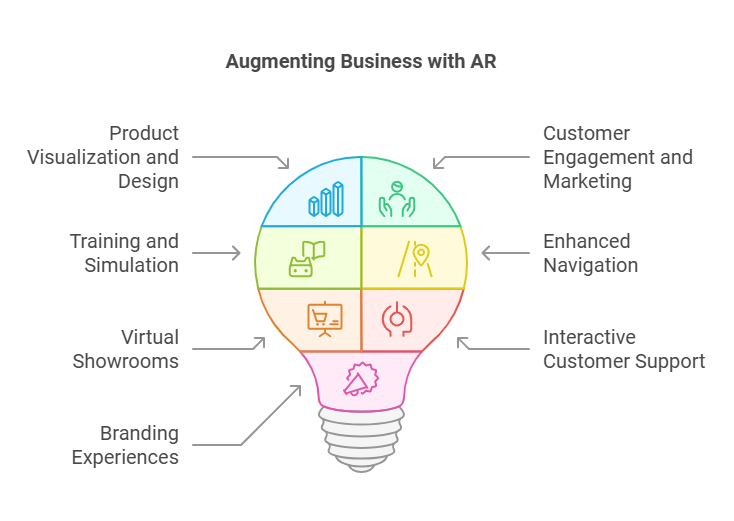
The AR Zone App delivers a variety of tools designed for business purposes that have the potential to elevate operations, client engagement, and overall impact substantially. By incorporating AR technology into business strategies, firms can make the most of its various possibilities:
- Product Visualization and Design:
Allows companies to demonstrate and modify products in 3D, enabling customers to examine and interact with products before purchase.
- Customer Engagement and Marketing:
Taps into AR features to develop engaging and memorable brand experiences and stimulate customer participation.
- Training and Simulation:
Employs AR technology to produce lifelike, engrossing training experiences for active learning and skill improvement.
- Enhanced Navigation for Business Locations:
Taps into AR technology to deliver immediate, interactive route instructions and localized route guidance for users.
- Virtual Showrooms and Exhibitions:
Deploy AR technology to produce interactive, visually rich environments for demonstrating products and services through virtual means.
- Interactive Customer Support:
Harnesses AR technology for immediate, visual customer assistance, elevating troubleshooting, and customer service satisfaction.
- Branding and Interactive Experiences:
Incorporates AR features to design engaging, immersive brand encounters that nurture customer loyalty and ongoing engagement.
Creating Your App Like AR Zone
Guidelines by Codment for building an app similar to AR Zone or App AR Zone, featuring crucial development tools.
Type of AR Apps:
AR apps can be categorized into types, such as marker-based, location-based, and SLAM-based (On-the-fly mapping and localization). Decide based on your AR app’s core functions. This is a brief guide to each type and where it is most beneficial.
- Marker-based:
It leverages QR codes to activate an augmented reality experience and is well-suited for applications such as marketing and product visualization.
- Location-based:
They work well for gaming, location-based services, and applications. They illustrate landmarks and GPS coordinates digitally on the mobile screen.
- SLAM-based:
It excels in applications that allow the integration of objects into the real world, including tasks like furniture positioning. It operates by monitoring the device’s orientation and location.
Type of Features
Samsung’s AR Zone app effortlessly blends digital features into the real world to ensure a superior user experience. It also features a collection of high-resolution 3D assets.
The intuitive interface ensures the mobile app is simple to navigate and engaging. These must-have capabilities should be part of your AR mobile app.
AR SDK
Choosing the right AR SDK can help your app succeed. The most commonly used SDKs for AR app development are AR Core, ARKit, Vuforia, and Unity. Each offers unique capabilities and compatibility with various devices, so choose the SDK that best fits your project goals.
3D Asset Creation Tools
AR apps that use low-quality 3D models are less dynamic and engaging. To produce high-quality 3D assets, it’s important to have the latest tools and expert 3D artists on hand.
Testing
Considering the unique nature of augmented reality app development, AR Zone App Android development comes with its own unique testing needs.
Validate that all 3D models are working properly and check for malfunctions. Carry out a live preview session before the AR app is published.
Crafting an app like AR Zone could prove to be difficult; however, these factors will guide you in the beginning.
Future of AR Apps: What Lies Ahead
Samsung’s AR Zone app’s future advancements and expansion in the AR sector are promising, fueled by the ongoing advancements in AR technology, artificial intelligence, and the Internet of Things (IoT).
Upcoming updates could improve user experiences through advanced object recognition, more immersive virtual environments, and seamless integration with Samsung’s devices, including wearables and AR glasses.
Broadening the app’s use cases beyond entertainment to incorporate business solutions such as virtual training, remote support, and AR-driven e-commerce could open up new revenue opportunities.
Furthermore, the growth of cross-platform compatibility, social AR interactions, and user-generated content would enhance engagement, establishing the AR Zone app as a key platform for both consumer and business AR experiences.